
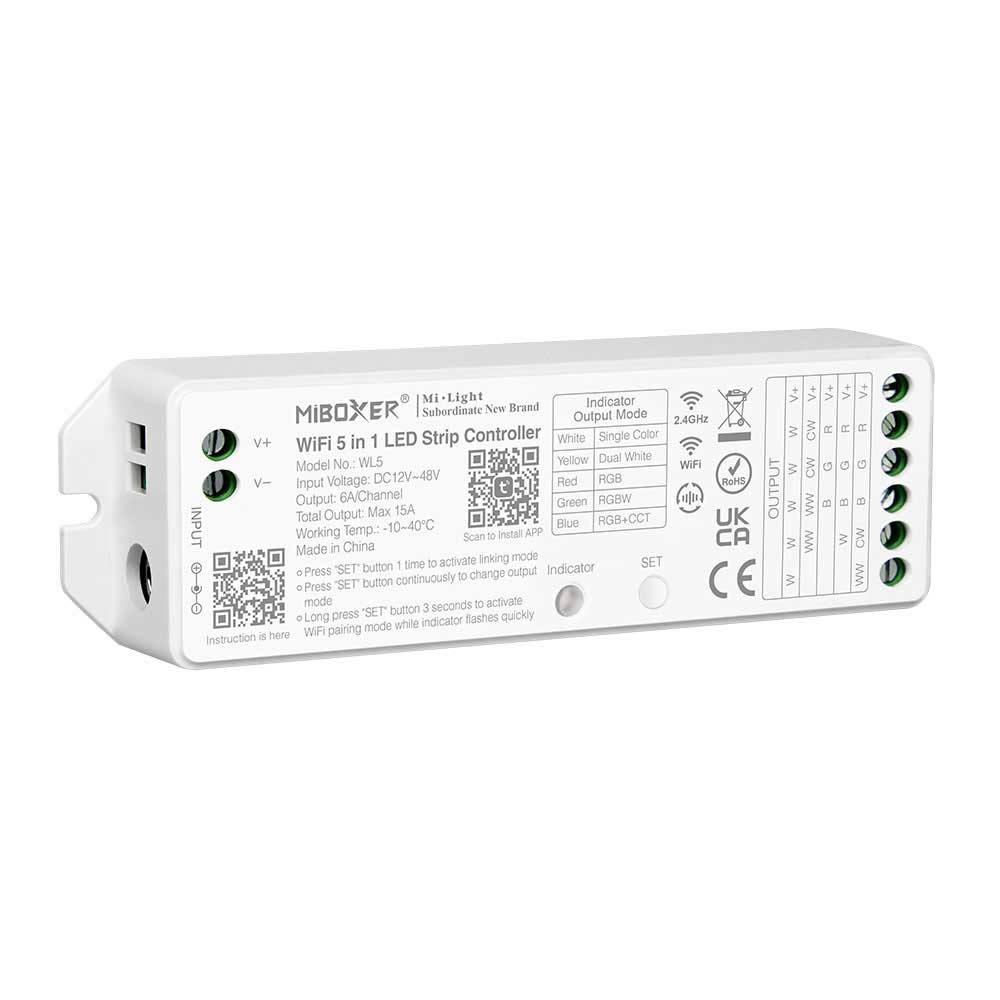
WL5 TuYa WiFi Controller 5 in 1 LED Strip MiBoxer Driver
$ 18.88
WL5 Tuya WiFi LED Controller Features WL5 is a Tuya WiFi LED controller, uses WiFi Bluetooth 2.4G wireless transmission technology, low power consumption, strong anti-interference ability. WiFi Bluetooth connect network can greatly enhance the connect network experience. When the router is disconnected, Bluetooth can also directly connect and control equipment at close range. After successful network configuration using Tuya Smart app to achieve wireless dimming, remote control, group control, scene control, timing control, music movement, biorhythm, sleep plan, wake plan, one key execution, automation, etc. functions. And it supports 2.4GHz RF remote and wall panel control. Work with Single color, Dual white CCT, RGB, RGBW, RGB CCT Color Changing LED light strips. Compatible with Tuya Smart app, supports Amazon Alexa, and Google Assistant voice control. Support DMX512 controllable, need to connect FUTD01 DMX512 LED Transmitter, only for RGB CCT output mode. WL5 Controller Parameters Model: WL5 Input Voltage: DC12-48V Output: 6A/Channel, Max 15A Communication Protocol: WiFi 2.4GHz WiFi Standard: IEEE 802.11b/g/n 2.4GHz 2.4G RF Control Distance: 30m Max Bluetooth Protocol: Bluetooth 4.2 (low power consumption) IP Rating: IP20 Non-waterproof Working Temperature: -20~60°C Dimension: 124*38*23mm / 4.88*1.49*0.94” How to Set up output mode for WL5 LED Controller? Set up correct output mode based on the feature of lights. Press “SET” button continuously to switch output mode (attention: it will log out without operation within 3 seconds) Linking Code Instructions For WL5 WiFi Controller Power off 10 seconds and power on again or short press ” SET ” one time Short press ” I ” button 3 times within 3 seconds. Lights blink 3 times slowly means linking is done successfully. Unlinking Code Instructions For WL5 Tuya LED Controllers Power off 10 seconds and power on again or short press ” SET ” one time Short press ” I ” button 5 times within 3 seconds. Lights blink 10 times slowly means linking is done successfully.
Related products
-
Sale!Select options This product has multiple variants. The options may be chosen on the product page
 Add to WishlistAdd to Wishlist
 -
Sale!Select options This product has multiple variants. The options may be chosen on the product page
 Add to WishlistAdd to Wishlist
 -
Sale!Select options This product has multiple variants. The options may be chosen on the product page
 Add to WishlistAdd to Wishlist
 -
Sale!Select options This product has multiple variants. The options may be chosen on the product page
Add to WishlistAdd to Wishlist